
When selling a used MacBook, one of the biggest questions is, "What condition is my device actually in?" While many sellers simply describe their MacBook as "used" or "working," buyers and professional buyback services evaluate devices using condition grades that reflect both cosmetic appearance and functional performance.
A MacBook in pristine condition will naturally command more attention than one with visible wear, but that doesn't mean a device with scratches or minor imperfections has little value. In reality, most used MacBooks fall somewhere between excellent and good condition, and buyers expect normal signs of use.
Understanding these condition grades helps you set realistic pricing expectations, communicate honestly with buyers, and avoid surprises during the selling process. Whether you're upgrading to a newer MacBook or planning to sell your MacBook in Dubai, knowing how condition is assessed can help you make more informed decisions before requesting offers.
This guide explains what each MacBook condition grade means, what buyers typically inspect, and how different levels of wear influence resale value in the UAE.
Quick Answer: What Are MacBook Condition Grades?
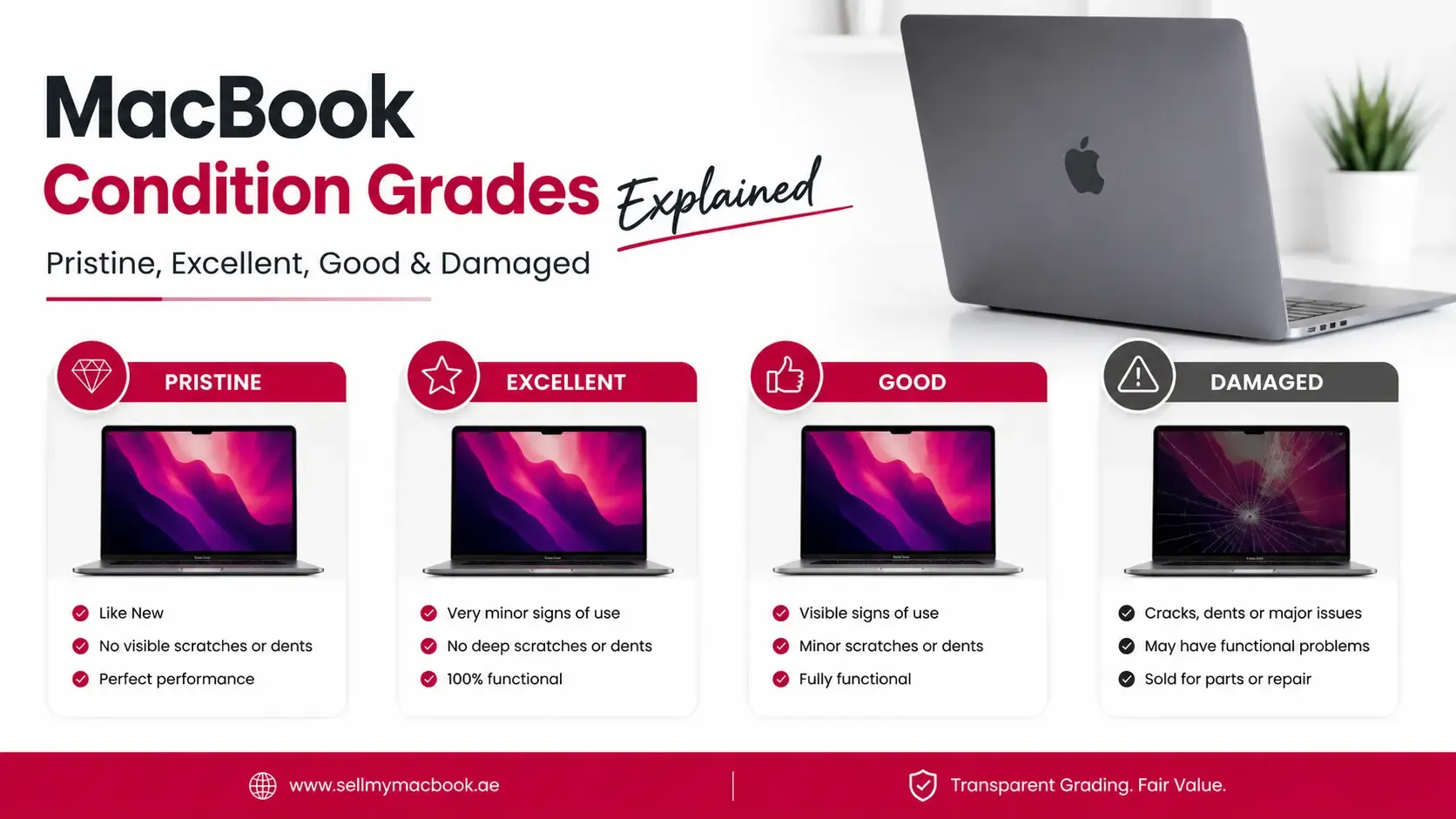
MacBook condition grades are standardized descriptions used to evaluate a device's cosmetic appearance, functionality, and overall usability. Although grading systems vary slightly between buyers, most MacBooks fall into one of four categories:
- Pristine – Almost like new with little or no visible wear.
- Excellent – Minor signs of careful use with full functionality.
- Good – Normal cosmetic wear but fully operational.
- Damaged – Visible damage or hardware issues that reduce value.
Condition is one of the most important factors affecting resale value, but it is evaluated alongside the MacBook's model, battery health, specifications, and current market demand.
Key Takeaways
- MacBook condition grades help buyers evaluate a device consistently.
- Cosmetic appearance and functionality are both considered during grading.
- Small scratches do not automatically place a MacBook in the damaged category.
- Battery health can influence the overall assessment of a device.
- Honest condition descriptions build buyer confidence and reduce negotiation issues.
- Even damaged MacBooks often retain resale value.
- Cleaning and preparing your MacBook before selling can improve first impressions.
What Is a MacBook Condition Grade?
A MacBook condition grade is a standardized way of describing the physical and functional state of a device. Rather than relying on subjective descriptions like "almost new" or "well used," condition grades provide buyers with a clearer understanding of what to expect.
Professional buyers, refurbishment companies, and individual purchasers all use condition grading to estimate resale value and compare devices with similar specifications.
Although grading terminology may differ slightly between businesses, the overall evaluation process is generally based on the same principles:
- Cosmetic appearance
- Hardware functionality
- Battery condition
- Display quality
- Structural integrity
- Overall usability
A MacBook with identical specifications can receive a significantly different valuation if its condition grade is lower due to visible damage or hardware issues.
What Buyers Check Before Assigning a Condition Grade
Many sellers assume buyers only look for scratches or dents, but a proper condition assessment is much more comprehensive.
Before assigning a condition grade, buyers typically inspect several areas of the device.
Exterior Condition
The first impression comes from the MacBook's physical appearance.
Buyers commonly check for:
- Scratches
- Dents
- Paint wear
- Bent corners
- Deep scuffs
- Cracks in the casing
Minor signs of everyday use are generally acceptable, but extensive cosmetic damage can reduce buyer confidence.
Display Quality
The display is one of the most valuable components of any MacBook.
During inspection, buyers often look for:
- Dead pixels
- Screen discoloration
- Pressure marks
- Cracks
- Brightness consistency
- Display coating wear
- Visible scratches
A clean, fully functional display usually contributes significantly to a higher condition grade.
Keyboard and Trackpad
Buyers also test everyday usability by checking:
- Sticky keys
- Missing keycaps
- Keyboard backlight
- Trackpad responsiveness
- Multi-touch gestures
- Palm rest wear
Since these components are used constantly, excessive wear can indicate heavy usage.
Battery Performance
Battery condition is no longer viewed as a separate consideration—it forms part of the overall ownership experience.
Buyers often review:
- Battery health
- Cycle count
- Charging behaviour
- Battery warnings
- Overall runtime
A MacBook with poor battery health may receive a lower overall evaluation even if its exterior remains in excellent condition.
Ports and Connectivity
Every port is typically tested to ensure proper operation.
This includes:
- USB-C or Thunderbolt ports
- MagSafe charging (where applicable)
- Headphone jack
- HDMI and SD card reader (on supported models)
- Wi-Fi connectivity
- Bluetooth functionality
Functional ports contribute to a stronger overall condition assessment.
Speakers, Camera and Microphones
Communication and multimedia features are also evaluated.
Buyers may test:
- Speaker clarity
- Camera quality
- Microphone performance
- Audio output
- Built-in sensors
Faults in these areas can reduce buyer confidence even if the MacBook appears cosmetically clean.
Pristine Condition
Pristine is the highest condition grade a used MacBook can typically achieve.
A MacBook in pristine condition closely resembles a new device and often shows little to no visible evidence of previous ownership.
Typical characteristics include:
- No noticeable scratches or dents
- Clean display without defects
- Excellent battery condition
- Fully functional hardware
- Well-maintained keyboard and trackpad
- Minimal signs of everyday use
Many pristine MacBooks have been used carefully, protected with sleeves or cases, and maintained regularly throughout ownership.
Because of their outstanding condition, these devices usually attract the strongest buyer interest and achieve the highest resale prices within their model category.
However, pristine does not necessarily mean unopened or unused—it simply reflects exceptional overall condition.
Excellent Condition
Excellent condition is one of the most common grades for well-maintained MacBooks.
These devices show light evidence of careful use while remaining fully functional.
Typical characteristics include:
- Small cosmetic marks visible only on close inspection
- Minor wear around ports or edges
- Clean display without cracks
- Fully working keyboard and trackpad
- Strong battery performance
- No functional defects
Many buyers actively search for excellent-condition MacBooks because they offer an attractive balance between appearance and price.
In Dubai's second-hand market, this grade often represents some of the best value for buyers looking for premium Apple devices at lower prices than brand-new models.
Good Condition
A MacBook in good condition has been used regularly but remains fully functional.
This is one of the most common grades found in the resale market because it reflects normal ownership rather than exceptional preservation.
Typical characteristics include:
- Visible scratches
- Minor dents
- Wear around corners
- Light keyboard shine
- Small cosmetic imperfections
- Fully operational hardware
Although these MacBooks show signs of everyday use, they continue to perform their intended functions without significant hardware problems.
Many buyers specifically look for good-condition devices because they offer lower purchase prices while still providing reliable performance.
Good condition should not be confused with damaged condition. Cosmetic wear alone rarely places a MacBook into the damaged category.
When Does a MacBook Become Damaged?
A MacBook generally moves into the damaged category when cosmetic issues are accompanied by functional problems or significant structural damage.
Examples include:
- Cracked display
- Liquid damage
- Broken hinges
- Battery swelling
- Non-functional keyboard
- Faulty trackpad
- Charging issues
- Speaker or camera failure
- Bent chassis
- Logic board faults
Although these issues reduce resale value, they do not necessarily make the MacBook unsellable.
Many buyers, refurbishment companies, and repair specialists continue to purchase damaged devices for repair, refurbishment, or parts.
If your MacBook has hardware faults, our guide on Can You Sell a Damaged MacBook in Dubai? explains how damaged devices are typically evaluated and what factors influence resale opportunities.
Does Battery Health Affect MacBook Condition Grades?
Battery health deserves special attention because it sits somewhere between cosmetic appearance and functional performance.
A MacBook may look almost new externally while still having significant battery degradation due to heavy daily use.
For this reason, many buyers consider battery condition when determining the overall quality of a device.
While poor battery health alone may not automatically change a MacBook from excellent to good condition, it often influences buyer perception and final pricing because it affects everyday usability.
Do Storage and RAM Affect MacBook Condition Grades?
One of the most common misconceptions among sellers is that higher specifications automatically result in a better condition grade. In reality, condition grading and hardware specifications are evaluated separately.
A MacBook with 24GB of RAM and 1TB of storage can still be graded as Good or Damaged if it has noticeable cosmetic wear or hardware faults. Likewise, an entry-level MacBook with 8GB of RAM and 256GB of storage may receive a Pristine grade if it has been exceptionally well maintained.
Condition grades focus on how well the MacBook has been cared for, not on its technical specifications.
However, storage and RAM still influence the overall resale value because buyers consider the complete package when comparing similar devices.
Common Mistakes Sellers Make When Grading Their MacBook
Many MacBook owners unintentionally overestimate the condition of their devices. While it's natural to view your own laptop more favorably, buyers evaluate condition objectively and compare it with many other listings.
Here are some of the most common mistakes.
Ignoring Small Cosmetic Damage
Tiny dents, scratches, and chipped edges may seem insignificant, but they contribute to the overall condition assessment.
Although these issues won't necessarily move a MacBook into the damaged category, they can affect whether it's graded as Pristine, Excellent, or Good.
Overlooking Battery Condition
Many sellers focus entirely on appearance while forgetting that battery health is part of the ownership experience.
A MacBook with an almost flawless exterior but poor battery performance may receive lower offers because buyers anticipate future replacement costs.
Assuming Age Determines Condition
Older does not always mean worse.
A carefully maintained five-year-old MacBook may receive a higher condition grade than a newer device that has been heavily used or poorly cared for.
Condition is based on the current state of the device, not simply its age.
Forgetting Functional Issues
Some sellers only notice cosmetic imperfections and forget to test every feature before selling.
Commonly overlooked issues include:
- Loose charging ports
- Faulty speakers
- Non-working microphones
- Camera problems
- Wi-Fi connectivity issues
- Sticky keys
Even small hardware faults can influence buyer confidence.
Using Unrealistic Descriptions
Describing a heavily used MacBook as "like new" often creates unnecessary disputes during inspections.
Providing an honest assessment supported by clear photos builds trust and usually results in a smoother selling experience.
How to Improve Your MacBook's Condition Before Selling
Although you cannot eliminate years of normal wear, there are several simple steps that can improve presentation and buyer confidence before selling.
Clean the Device Thoroughly
Remove fingerprints, dust, and debris from:
- Display
- Keyboard
- Trackpad
- Ports
- Exterior casing
A clean MacBook immediately creates a better first impression.
Remove Stickers and Residue
If your MacBook has stickers or adhesive residue, remove them carefully without damaging the finish.
A clean exterior helps buyers evaluate the actual cosmetic condition.
Include Original Accessories
If available, include:
- Original charger
- Charging cable
- Original box
- Documentation
Accessories don't usually change the condition grade itself, but they improve the overall buying experience and can increase buyer confidence.
Back Up and Erase Personal Data
Before handing over your MacBook:
- Back up important files.
- Sign out of iCloud.
- Disable Find My Mac.
- Erase all personal data.
- Reinstall macOS if appropriate.
Completing these steps demonstrates responsible ownership and prepares the device for its next user.
If you're unsure about the complete preparation process, our Complete Guide to Selling a MacBook in Dubai walks through everything you should do before listing or handing over your device.
How Condition Affects Overall Resale Value
Condition is one of the strongest influences on MacBook resale value because it directly affects buyer confidence.
However, buyers never evaluate condition alone.
Instead, they consider several factors together:
- MacBook generation
- Processor
- Battery health
- RAM
- Storage capacity
- Cosmetic appearance
- Hardware functionality
- Current market demand
Two MacBooks with identical specifications can receive noticeably different offers if one has visible wear or functional issues.
Likewise, a MacBook in excellent condition may command stronger interest even if it has lower storage or RAM than another device in poorer condition.
Once you've identified your MacBook's condition grade, you can read How Much Is My MacBook Worth in the UAE to understand how condition, specifications, and market demand work together when estimating resale value.
If you're looking for a more personalized estimate, you can check your MacBook value by providing details such as the model, condition, battery health, RAM, and storage configuration.
Why Honest Condition Grading Benefits Everyone
Some sellers worry that being completely honest about scratches or minor wear will reduce interest.
In reality, accurate descriptions usually produce better results.
Benefits include:
- More realistic buyer expectations
- Fewer negotiations
- Faster inspections
- Greater trust
- Reduced chance of cancelled sales
Experienced buyers can usually identify cosmetic or functional issues during inspection, so transparency often leads to a smoother transaction.
FAQ: MacBook Condition Grades Explained
What is the best MacBook condition grade?
Pristine is generally the highest condition grade. It describes a MacBook that shows little to no visible wear, functions perfectly, and has been exceptionally well maintained.
Does a small scratch reduce my MacBook's condition grade?
Not necessarily. Minor cosmetic marks are common on used devices and may still fall within the Excellent or Good condition categories depending on their severity and location.
Can a damaged MacBook still be sold?
Yes. Many damaged MacBooks still retain resale value, especially if they can be repaired or used for parts. The final value depends on the type and extent of the damage.
Does battery health affect condition grading?
Yes. While battery health is evaluated separately from cosmetic appearance, poor battery performance can influence the overall assessment because it affects everyday usability.
Is cosmetic appearance more important than functionality?
No. Buyers evaluate both. A MacBook that looks clean but has hardware faults may receive a lower overall assessment than one with light cosmetic wear but excellent functionality.
Should I repair my MacBook before selling it?
It depends on the repair cost and the expected increase in resale value. Minor cosmetic issues often don't require repairs, while fixing significant hardware faults may improve buyer confidence.
Does the age of my MacBook determine its condition grade?
No. Age and condition are different. An older MacBook that has been carefully maintained can receive a higher condition grade than a newer device with heavy wear or damage.
How do buyers determine a MacBook's condition?
Buyers usually inspect the exterior, display, keyboard, trackpad, battery health, ports, speakers, camera, and overall functionality before assigning a condition grade.
Final Thoughts
MacBook condition grades provide a practical way to describe a device's overall quality and help buyers compare different listings with greater confidence. Rather than focusing solely on appearance, a proper assessment considers cosmetic wear, hardware functionality, battery performance, and the overall ownership experience.
Most used MacBooks fall into the Excellent or Good categories, and that's perfectly normal. Everyday signs of use don't necessarily prevent a successful sale, provided the device is accurately described and functions as expected.
Taking time to understand your MacBook's condition before selling allows you to set realistic expectations, communicate honestly with buyers, and better understand how your device may be valued in the UAE market.
If you're researching resale options, Sell My MacBook UAE offers additional resources to help you understand the factors that influence MacBook resale value and prepare your device before selling.